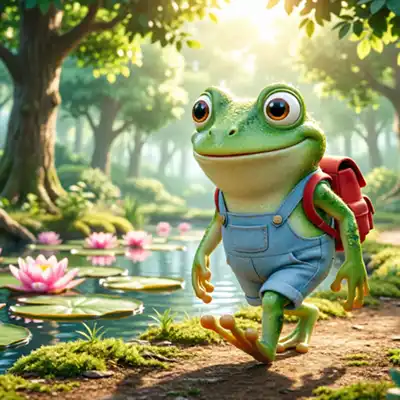
The little frog needs to get to school… but the path leads across the pond!
Lily pads float on the water's surface, and each one has a math problem on it. Your task is to find the ones whose result matches the target number displayed on the screen. When you click on the correct leaf, the frog will happily jump onto it.
This isn’t just “cramming” the multiplication table or tedious practice of addition and subtraction.
The game trains flexible mathematical thinking—instead of calculating the result, we look for the operation that matches it.
It’s a kind of “backward math” that teaches number association, explores different paths to the same result, and builds confidence in calculation. The game was designed with first-grade students in mind, but thanks to its adjustable range (10–50) and customizable number of tiles, it’s also suitable for children who need a little more time to solidify the basics. The calm animation, lack of time pressure, and randomly generated paths make learning math a relaxing adventure.
Select a level, click on the leaves, and guide the little frog safely to the other side.
This number is displayed at the start of the game, in the bar at the bottom of the screen, and in the final field.
Start the game by clicking the “Start” button.
From this moment on, the timer starts counting down, and the end field is highlighted with a moving border.
Remember: this is not a timed game! The timer is for informational purposes only.
The player’s task
Guide the animated frog across the squares where the result of the mathematical operation equals the target number.
The frog will only jump to squares that are selected correctly.
Path and Order
The squares with correct answers form a continuous path on the board, connecting the start to the finish. You don’t have to select them in order—you can click any correct field in any order. The frog will automatically move to the selected field.
The stage ends only after all fields belonging to the path have been selected, including the start and finish.
Randomness of the game
The shape, length of the path, and placement of actions are randomly generated for each game. The layout rarely repeats, so memorizing the route is practically impossible, especially on larger boards.
Mistakes and corrections
Clicking on a cell with an incorrect result will display a pop-up window allowing you to select the correct answer. This is an educational and motivational feature—the correction itself does not affect the course of the game, but it is recorded in the statistics as a “correction.”
Stage Summary
After selecting the entire path, a summary table will appear: number of fields, mistakes, corrections, total game time, and average time per field. The data is statistical and is used to track progress.
Settings panel
Mathematical operations
Addition and subtraction are basic operations—they are always enabled and cannot be disabled.
Multiplication and division can be enabled or disabled separately.
By default, all options are enabled.
Number range
The default range is 10, and the maximum available range is 50.
Selecting a higher range expands the pool of numbers and operations that appear in the game.
Each higher range automatically includes values from lower ranges as well.
Number of Tiles
There are 5 board sizes available: from the default (27 tiles) to the largest (85 tiles).
On devices with smaller screens, we recommend selecting boards with fewer squares.
Result animation (Puff)
After correctly selecting a square, a short animation displaying the operation and the result is shown.
This helps reinforce the correct solution visually.
Frogs as a species are much older than one might think—they’ve been living on Earth for more than 250 million years! This means that their ancestors (such as Triadobatrachus) appeared on Earth even before the first dinosaurs.
And although the first frogs were already hopping around the Earth in those ancient times, the real boom in their diversity occurred 66 million years ago. When an asteroid struck the Earth, wiping out the dinosaurs, the devastated natural world began to recover in a new way. It was then that the extinction of other creatures paved the way for the evolution of the frogs of that era and gave rise to as many as 88% of the frog species living today.
Over the course of millions of years, many different species of these amphibians have emerged. Some of them have developed amazing superpowers through evolution. Here are a few surprising facts about frogs for you!
Some unusual facts about frog parenting.
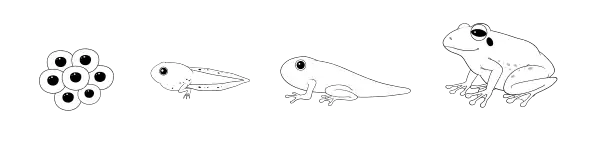
Practically everyone knows how a frog’s typical life cycle unfolds. A tadpole hatches from a frog’s egg; it breathes through gills and swims happily in a pond. It’s like a little ball with eyes and a tail. After a while, its legs grow, its tail begins to disappear, and slowly it transforms into a little frog. The frog grows and grows until it finally reaches adulthood. Then it lays eggs, from which tadpoles hatch... But this doesn’t apply to every single species of frog!
Some examples:
Frogs from the stomach.
Just a few decades ago, a species called “Rheobatrachus silus” (southern gastric-brooding frog) existed. The female swallowed her eggs, which developed in her stomach into tiny frogs that later leaped directly out of her mouth. Interestingly, while the eggs were in the mother’s stomach and developing, her body completely stopped producing stomach acid. The tiny frogs were therefore completely safe there. Unfortunately, the last wild specimen was observed in southeastern Queensland, Australia, in 1983. Since then, despite an intensive search, no representatives of this species have been found. Scientists from the Lazarus Project are attempting to revive this species by transferring cells from frozen tissues of the gastric-brooding frog into the eggs of a related species. So far, however, they have not been entirely successful.
Tadpoles in the trees.
Not all tadpoles swim in a pond – some tropical species (e.g., from the genus Ranitomeya) carry their tadpoles on their backs high into the tree canopies. There, they place them one by one into micro-reservoirs of water that form in the leaves of plants. The mother regularly visits these hiding spots to feed the little tadpoles in their pools.
Tadpoles that don't swim in a pond.
Females of some species (e.g., some toads) lay their eggs in moist leaf litter or on leaves. Fully developed, miniature frogs hatch from the eggs, completely skipping the swimming tadpole stage. There are also rare species (e.g., the African Limnonectes larvaepartus) that do not lay eggs, but give birth to already fully developed, live tadpoles or fully developed young individuals.
Shocking frog anatomy.
Swallowing with their eyes:
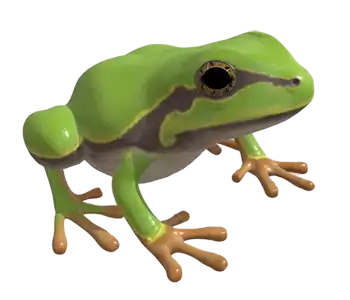
Frogs cannot chew their food, and their tongues are used only to catch it. To push the caught prey from their mouth into their stomach, frogs literally pull their eyeballs deeper into their skull. The eyes press against the roof of the mouth and help with swallowing.
Bones with tree rings, just like trees:
Every year, when a frog goes into winter hibernation, a new layer of tissue forms on its bones. Scientists who study amphibians (herpetologists) can determine the exact age of a frog by counting these rings under a microscope – exactly the same way tree rings are counted in a tree trunk.
Natural winter hibernation:
The wood frog (Lithobates sylvaticus) can freeze completely solid in the winter. Its heart stops beating and blood stops circulating. Thanks to a high concentration of glucose in its body, the water freezes only between the cells, without damaging them. In the spring, the frog simply thaws out and goes on its way.
This superpower would be very useful for astronauts, for example. During very long journeys to the stars, they could simply "freeze". And upon arrival at their destination, probably after many, many years, they would simply thaw out and explore the surroundings.
Drinking with their bellies:
Frogs never drink water through their mouths. On their bellies, they have a special area of highly permeable skin, through which they rapidly absorb moisture directly from the ground or from dew.
Frog superpowers.
Imagine a frog that, instead of hopping on the ground, glides high among the trees like a little airplane! It's not a fairy tale – in the tropical forests of Asia lives a species called the "Flying Tree Frog" (Rhacophorus reinwardtii).
How do they do it?
Huge feet with webbing:
These frogs have gigantic feet and wide, flexible webbing between all their toes (similar to those of ducks).
Living parachute:
When a frog wants to escape a predator or simply move to another tree, it jumps into the air, spreads all four legs wide, and stretches the webs. They then act like four little parachutes!
Gliding and turning:
The flying frog can glide through the air for a distance of up to 15 - 20 meters! Interestingly, it can use its limbs to steer and turn during flight to land perfectly on a chosen leaf.
Super glue on their toes:
To ensure that landing on a slippery, wet leaf doesn't end in a fall, their toes are tipped with special, sticky suction cups. They work like dry Velcro!
And finally, something truly amazing – the glass frog!
Can you imagine a creature that has a belly made of glass? In South America live amazing glass frogs (family Centrolenidae). From above, they look like ordinary green frogs, but when we turn them on their backs or when they sit on glass... a miracle happens!
How does their superpower work?
The skin on their bellies and chests is completely transparent – it looks like clear glass. When you look at a glass frog from below, you can see absolutely everything inside! You can see the little, red, beating heart pumping blood, the coiled intestines, and in females, even the tiny, black-and-white eggs.
What is such a belly for? It's a kind of invisible raincoat – genius camouflage. When a glass frog sits on a leaf, sunlight passes right through its body. Thanks to this, from the perspective of a predator below, the frog literally "blends into the background" and becomes almost invisible. Moreover, they have green... bones. So from the bottom of the leaf, it's really hard to spot them!
Although most of the frogs we meet on walks are completely harmless and help us by eating annoying mosquitoes, in distant tropical forests live their extraordinarily colorful relatives. These colorful miniatures warn other animals: "Watch out, I am poisonous, do not touch me!" It is important to remember that frogs are wild animals that should not be touched or petted. Some species, even those that do not live in tropical climates (like toads, for example), secrete a special, burning fluid through their skin to defend against danger. For a human, touching such a frog can end in a rash on the palms, and if you touch your eyes, severe tearing. Therefore, the best rule for every young nature explorer is to admire frogs exclusively with their eyes, without disturbing their natural home.
There are tomato frogs that puff up like a big, red ball in case of danger... There are bullfrogs that... moo loudly like a real cow in a pasture! Many more such curiosities could be listed.
Many myths and legends have also formed around frogs. For example, a frog's tongue is not as long as they show in cartoons. On average, its tongue is about 1/3 the length of its body. If a human had such a long tongue..., can you calculate how far it would reach? Measure how tall you are, and divide it by three. Then take a ruler, a meter stick, or a tailor's tape measure, hold it to your mouth, and try it out!
The world of frogs is full of surprises and curiosities, it's worth being interested in it!
Frog heroes in the human world
Did you know that frogs sometimes need our help? Every spring, these little amphibians set out on a great journey to find a safe place to live. Their path often leads across roads where cars drive. Fortunately, all over the world – in Europe and many other places – people care for their green neighbors! Special underground tunnels are built for them, and sometimes traffic on roads is even closed so the frogs can cross in peace. Every year, amazing events are also organized, where children together with parents and volunteers help amphibians get safely to the other side of the street. It's a great way to become a real nature superhero in your area!
Do you want to help frogs in the real world? In the spring, you can become a real nature protector! Spring relocations of frogs and other amphibians across dangerous roads are organized in many places around the world. If you want to get involved as a volunteer, the best information and contacts for organized events can be found on the websites of the administration of the nearest national park or protected landscape area (PLA). Just type "frog action volunteers" or "amphibian transfer across roads [Your city/region]" into the search engine.
Crayfish
Crayfish, just like frogs, are true veterans of our planet! Crustaceans, to which crayfish belong, have been present on Earth for more than 200 million years – which means they lived here even before the first birds appeared in the sky!
Over all those millions of years, crayfish have practically not changed. Their build is so perfect that they survived all major natural disasters. That is why scientists sometimes call them "living fossils" – it's as if someone who had breakfast with dinosaurs every day survived from prehistoric times until today!
The noble crayfish is the native crayfish species in Central Europe. Once, even 150 years ago, it was so common in rivers and lakes here that it was caught by the thousands. Unfortunately, today encountering it is a real rarity and it is protected.
It has very high demands – it lives exclusively in clean, cold, and well-oxygenated waters. If the water is just a little dirty, the crayfish will move away. That is why scientists call it the "barometer of water purity" – where a crayfish lives, the water is definitely crystal clear!
We have a few interesting facts about the life of crayfish for you!
Unusual facts about crayfish parenting.
Most fish lay their roe and just swim away – and then little fish hatch from the eggs. With crayfish, it's different!
The carrying mother.
The female noble crayfish carries her eggs... under her tail! She lays up to 200 eggs and glues them to the underside of her abdomen. For the next 6 months, the female literally carries them everywhere with her – she swims, eats, hides in burrows, and her tail is constantly bent so that the tiny eggs are safe and have a constant supply of fresh, oxygenated water.
White water creatures.
When the little crayfish hatch from the eggs after half a year, they are... completely transparent and white! They look like little water ghosts. Only after the first molting (i.e., shedding the shell) do they start to gain color. Moreover, during the first 10 days, the tiny crayfish do not move away from their mother at all – they hold onto her abdomen as if it were their first home. Mom still protects them, and they feed on the remains of the yolk that they still have left from their life in the egg.
Interesting crayfish anatomy.
Shedding the shell, or molting.
Crayfish have a hard shell that protects them like knight's armor. But there is one problem – the shell does not grow together with the crayfish! In order for the crayfish to grow, it must from time to time shed its old shell and wait for the new one to harden. It's as if you had to shed your skin every year and walk around in something soft like jelly for a few days! When a crayfish molts, it is completely defenseless – soft as rubber. It then hides in burrows and waits for the new shell to harden. Young crayfish molt even several times a year because they grow quickly. Older crayfish molt less often – sometimes only once every two years. Interestingly, crayfish eat the old shell themselves! There is a lot of calcium in the old shell, which is useful for building the new one.
Sometimes you can find an empty crayfish shell. Especially under stones, in depressions on the banks, in plant overgrowth, or under submerged branches. Such an empty shell looks almost exactly like a live crayfish. If you find such an empty shell of a noble crayfish, it is worth taking photos and reporting your find. It will help in the protection of this species!
WARNING!!! Do not move the empty shell or take it away!!! The crayfish might be hiding in its burrow somewhere nearby. It is tired, weakened, and above all soft as jelly. And it is simply waiting for its new shell to harden at least a little bit. Then it will return to the empty shell and will slowly crush it and gradually eat it. For him, it means a lightning-fast delivery of minerals necessary for the new shell to harden. If you take away his old shell, the crayfish will have to look for the necessary calcium somewhere far away, and he doesn't have the strength for that!
Eyes like periscopes
The crayfish has eyes placed on movable stalks, like little submarine periscopes! Thanks to this, it can observe the surroundings without exposing the rest of its body. Moreover, its eyes can work independently of each other – one looks to the left, the other to the right! The crayfish also sees colors, but not as sharply as we do – rather like through a veil. On the other hand, it perfectly perceives movement and changes in light intensity.
Two different claws:
The noble crayfish has two large claws, but... they are not the same! One claw is larger and more massive – it is used for crushing hard snail shells or armored insect larvae. The other is smaller and more agile – it works like tweezers and is used for grabbing finer things, e.g., pieces of plants. It's as if you had a hammer in one hand and tweezers in the other!
Breathing underwater and above water:
The crayfish breathes with gills, which it has hidden under the shell on the sides of its body – similarly to fish. However, it can survive out of water for several hours if its gills are moist! That is why you can sometimes come across a crayfish moving on land, e.g., on a rainy night, when it moves from one body of water to another.
Crayfish superpowers
Escaping backwards.
Imagine a creature that can escape danger... by reversing! It's not a joke – the noble crayfish, when it senses danger, sharply waves its tail and shoots backwards like a bullet from a gun. In a fraction of a second, the crayfish disappears into its burrow before the predator can even blink.
Regeneration – limb renewal:
The crayfish has one more amazing ability – if it loses a claw or a leg (e.g., during a fight or when caught by a predator), then... a new one will grow! This is called regeneration. The new limb is initially tiny, but with each molting it grows more and more, until it finally reaches normal size. Unfortunately, this process takes a long time – sometimes even several years. Sometimes a crayfish loses a limb even when leaving its old shell.
Night ninja:
The noble crayfish is a real night ninja! During the day, it hides in burrows, under stones, or in the roots of coastal trees. Only after dark does it set out on a "hunt". However, the crayfish is not a typical hunter – it is more of a cleaner. It simply eats everything that lies on the bottom. Thanks to this, it plays the role of a "cleaner" – without it, the bottom of rivers and lakes would be covered with rotting remains.
Life in winter:
In winter, when the water gets very cold, the crayfish slows down its pace. It doesn't fall into a deep winter sleep like a frog, but becomes very inactive. It hides deep in a burrow, which it often digs to a depth of up to one meter, and waits for spring. Interestingly, crayfish dig their burrows so precisely that they have a special "chimney" for ventilation – so that even in an enclosed space they have a supply of fresh water!
Something to think about and remember – crayfish plague!
Did you know that the noble crayfish is mortally threatened... by its relatives from America?
How did this happen?
At the end of the 19th century, people brought other crayfish species from North America – e.g., the spinycheek crayfish and the signal crayfish. These American crayfish looked similar and were also edible, so they were bred in European waters. But there was one problem – the Americans were resistant to a dangerous fungal parasite that caused a disease called "crayfish plague".
The American crayfish did not get sick – they were only carriers. But when the fungus got into the waters where our noble crayfish lived, they started to get sick en masse. And for the noble crayfish, "crayfish plague" is practically always fatal.
The scale of the tragedy:
Imagine that once the noble crayfish occurred in hundreds and thousands of places. Today, only a few percent remain from this huge number! It's as if only a few villages remained from a mighty kingdom. That is why scientists are working on protecting the noble crayfish – they set up special breeding programs and release young crayfish into clean lakes, far away from the American invaders.
How to help?
The most important rule: never move crayfish from one body of water to another! Even if you want to "help" – you can unknowingly transmit "crayfish plague". That is why divers and fishermen should thoroughly clean and disinfect their equipment before entering the water in a new place.
The world of crayfish is just as fascinating as the world of frogs, like all that rich nature! And what if it's exactly you who finds a way to cure the noble crayfish?
Koi
Fish, compared to frogs or crayfish, are absolute record holders. The first species of fish appeared over 500 million years ago. However, they did not resemble today's specimens very much. Only much later, about 400 million years ago, the ancestors of fish as we know them today began to form. Without going into details, the main branch of this species split into two groups at that time. From one of them (bony fish) come more than 95% of all fish species we know today. And from the other (fish with a cartilaginous skeleton) – among others, sharks and rays.
Did you know that we are a little bit like fish?
Imagine your family tree. You have parents, grandparents, great-grandparents, and if we went back in time millions of years, we would reach ancestors who lived in the prehistoric ocean. They were creatures that looked like fish.
One day, however, these "fish grandpas and grandmas" of ours decided to explore the land.
Legs and hands gradually grew from their fins.
Instead of gills, lungs developed so they could breathe air.
Over time, they became amphibians, then reptiles, mammals, and finally us – humans.
Scientists who study the evolution of life use one rule: You can't run away from the family. Because all people, dogs, birds, and elephants come from these prehistoric fish, from a scientific point of view, we are all just highly improved "land fish".
We have the proof right in our bodies! When a baby develops in its mother's belly, in the first weeks it has small grooves on its neck that look exactly like fish gills. Only later do ears, jaws, and a neck form from them. Even the bones in our hands are arranged almost the same way as the bones in the fins of our ancient fish ancestors.
So next time you see a fish swimming in an aquarium, you can easily wave to it like to a very, very distant cousin!
Relations between humans and fish evolved from simple hunting to breeding. For people, fish represent the most important source of protein, vitamins, and omega-3 fatty acids, which are important for the functioning of the human heart, brain, and eyesight. Fish also play an important role in the ecosystem and culture.
Fish are the third most popular group of pets in the world. Observing aquariums has a calming effect on humans. And that brings us to one of the characters of this game.
Extraordinary, but ordinary origin
Koi amaze with their colorful variety, but in reality they are ordinary... carps! Carp is not just an ordinary fish, it is one of the most important freshwater farmed fish in the world.
In many countries, in their traditions and culinary culture, carp holds a special place as the main Christmas Eve dish. As a food source, carp was known already in ancient countries: China and Persia. Carps were bred exclusively for food purposes, no one paid attention to their colorfulness. The first mentions of the interesting coloring of these fish come from ancient China. However, these were only curiosities.
And here is another curiosity – in old Japan, carp breeders pulled the fish out of the ponds for the winter and placed them in water tanks under the floors of their houses! It was a very important source of food for them during the hard winter months.
And it was these people who at some point noticed that some of these fish had interesting colors. It was around 1830. They started to intentionally breed and cross the most beautiful individuals. Such beautiful specimens were bred that when they were first presented to the wider public at an exhibition in Tokyo in 1914, the world was enchanted. And this exhibition was visited by over 7 million people at that time! Of course, not only because of the fish, but still it was a considerable attendance.
What does "koi" actually mean?
The word "koi" in Japanese simply means carp. However, for the Japanese, these colorful fish are real superheroes! According to an old, beautiful legend, carps are a symbol of extraordinary strength, courage, and perseverance. Although this legend has Chinese origins, it was fully adopted by Japanese culture, where carps (nishiki-goi) became a national symbol of tenacity and success.
It tells of a large school of carps that swam against the current of the Yellow River and fought with the strong current. When they reached a huge waterfall, most of them gave up. One, the strongest carp, however, did not stop jumping and fighting the roaring water, until it finally jumped all the way to the very top.
The gods were so fascinated by his extraordinary perseverance that they rewarded him by turning him into a mighty golden dragon! That is why today koi carps remind children all over the world to never give up, to persistently strive for their goal, and to believe that any obstacle can be overcome.
Exceptional superpowers of koi carps
Today, koi carps are bred and admired all over the world. Maybe they don't have such superpowers as frogs or crayfish, but they are not just ordinary carps.
Intelligence
For example – koi are surprisingly intelligent! They can recognize their caregiver. When you approach the pond, they immediately swim up to you because they know they will get food soon. However, they will watch a stranger from a safe distance. Moreover, they even recognize footsteps! If their caregiver walks barefoot on a wooden pier, the koi will remember this characteristic sound and swim up as if someone called them. They don't have ears, but they are very sensitive to any water vibrations.
Memory
They also have a great memory. They can learn to eat from a hand, and some individuals can even be... petted! In Japan, they are treated almost like pets – they are given names and the fish can react to them. Imagine a fish that swims up to you when you call it by name!
Sensitivity
Did you know that some varieties of koi can... get sunburned? White and red scales are sensitive to strong UV radiation, so koi hide in the shade on hot, sunny days. They prefer to hide under the large leaves of water lilies, which float on the surface of the pond like natural sunshades. This is one of the reasons why lilies are so important in Japanese water gardens – they provide protection from the sun for the fish. And in our game, a frog jumps on the leaves and solves math puzzles!
Giant fish
Koi can also grow to really remarkable sizes – even up to one meter in length! And the older they are, the more beautiful colors they have. Some patterns on their scales are so unique that every specimen looks like a living work of art. No wonder they are called "floating flowers" or "living jewels" in Japan.
Longevity
Koi also reach a really high age. A lifespan of 50–70 years is not at all unusual for koi. The most famous koi carp named Hanako is said to have lived... 226 years! It survived seven owners and remembered the times before the invention of the lightbulb. But... a moment for reflection. If you count those years, you'll notice something strange: the carp Hanako was supposed to be born in 1751. That is almost 100 years before colored koi carps were even bred in Japan! How is this possible?
Truth Detective: How the carp Hanako "tricked" the internet?
When you read about koi on the internet, on almost every page you will find information that the oldest fish in the world – Hanako – lived up to 226 years and had up to 7 owners during its life! Sounds unbelievable, right? But if you try to find the names of these seven people... you will uncover a big secret. You won't find them anywhere! This story is a classic internet legend, which works like a game of "Telephone" or "Broken telephone". One author miscalculated the growth rings on the fish's scales, another added a legend to it about how the fish was passed from hand to hand for generations, and others blindly copied this information. For us, it's a great lesson: even if some information is repeated on a hundred different pages on the internet, it always pays to stay vigilant and ask: "And where do we actually know this from?"
The only real name: Dr. Komei Koshihara
The only confirmed owner of this fish was a Japanese doctor, Dr. Komei Koshihara. In 1966, he appeared on Japanese national radio (NHK) and told a touching story about his beloved red fish Hanako, which swam in a pond in Gifu Prefecture. It was this Dr. Koshihara who invited his friend, Professor Masayoshi Hiro, to examine the fish's scales. When the professor announced the incorrect result (215 years), the doctor and the media had to somehow explain where the fish in the pond came from in the first place.
Where did the "seven owners" come from?
Dr. Koshihara claimed that the fish was passed down in his own family from generation to generation (like a family heirloom). When this story got into Western media and later on the internet, the authors of the articles used simple math: Since the fish lived 226 years, and one human generation (or the time an adult person takes care of the fish) lasts about 30–35 years, the fish must have had about 7 owners during its life. This number fit perfectly into the headlines: "The fish that survived 7 generations of owners!" or "It survived 7 Japanese emperors!". In reality, no names or surnames of the previous six owners exist, because no one ever recorded them. Dr. Koshihara simply remembered the fish from his childhood, when it belonged to his grandparents.
Professor Masayoshi Hiro, who examined Hanako, also examined other fish from the same pond. According to his measurements, each of them was over 100 years old! It's a bit strange, such a gathering of long-lived fish in one pond.
The age of this exceptional fish has been hotly debated for years. Most serious media claim that it is only a legend and that the research regarding its age was burdened with large errors.
Conclusion? If something sounds too much like a fairy tale, it can be expected that it really is a fairy tale. No matter what you read on the internet, always verify the credibility of the source.
Breeding
The most famous place for breeding these fish is, of course, Japan, specifically the mountainous region of Niigata. That's where it all started. And it is the Japanese koi that are considered the standard of beauty and literally reach astronomical prices at auctions. There are also breeders in Europe, the USA, and some Asian countries. One of the largest and most prestigious breeding stations is located in Poland.
Maybe Japanese koi are the standard of beauty. But the world doesn't stand still and things are constantly changing! Maybe it will be you... the one who one day breeds the most beautiful koi?
Drawings and models from websites: Vecteezy, Pinterest, Svgsilh, Pexels, Wikipedia, Sketchfab, Pixabay
 Frogs cannot chew their food, and their tongues are used only to catch it. To push the caught prey from their mouth into their stomach, frogs literally pull their eyeballs deeper into their skull. The eyes press against the roof of the mouth and help with swallowing.
 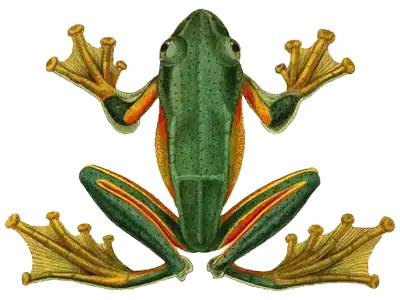 Imagine a frog that, instead of hopping on the ground, glides high among the trees like a little airplane! It's not a fairy tale – in the tropical forests of Asia lives a species called the "Flying Tree Frog" (Rhacophorus reinwardtii).
  Can you imagine a creature that has a belly made of glass? In South America live amazing glass frogs (family Centrolenidae). From above, they look like ordinary green frogs, but when we turn them on their backs or when they sit on glass... a miracle happens!
 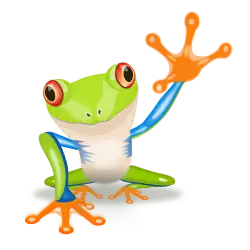 Although most of the frogs we meet on walks are completely harmless and help us by eating annoying mosquitoes, in distant tropical forests live their extraordinarily colorful relatives. These colorful miniatures warn other animals: "Watch out, I am poisonous, do not touch me!" It is important to remember that frogs are wild animals that should not be touched or petted. Some species, even those that do not live in tropical climates (like toads, for example), secrete a special, burning fluid through their skin to defend against danger. For a human, touching such a frog can end in a rash on the palms, and if you touch your eyes, severe tearing. Therefore, the best rule for every young nature explorer is to admire frogs exclusively with their eyes, without disturbing their natural home.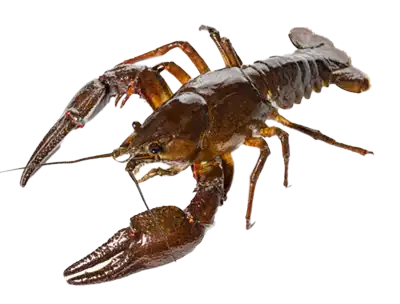
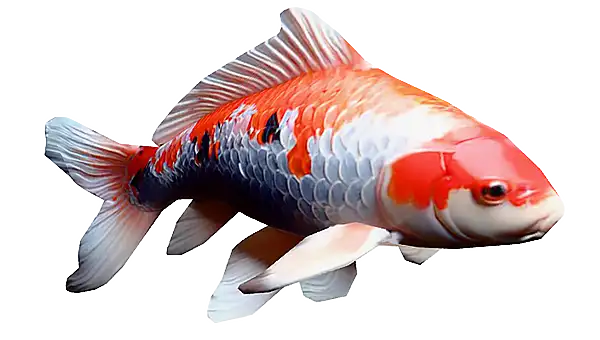
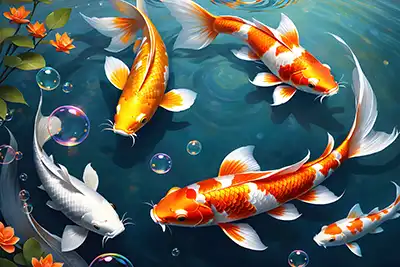 Did you know that some varieties of koi can... get sunburned? White and red scales are sensitive to strong UV radiation, so koi hide in the shade on hot, sunny days. They prefer to hide under the large leaves of water lilies, which float on the surface of the pond like natural sunshades. This is one of the reasons why lilies are so important in Japanese water gardens – they provide protection from the sun for the fish. And in our game, a frog jumps on the leaves and solves math puzzles!